Layby Legends: The 20-Minute Roadside Gauntlet That Saves You From a Dead GPU
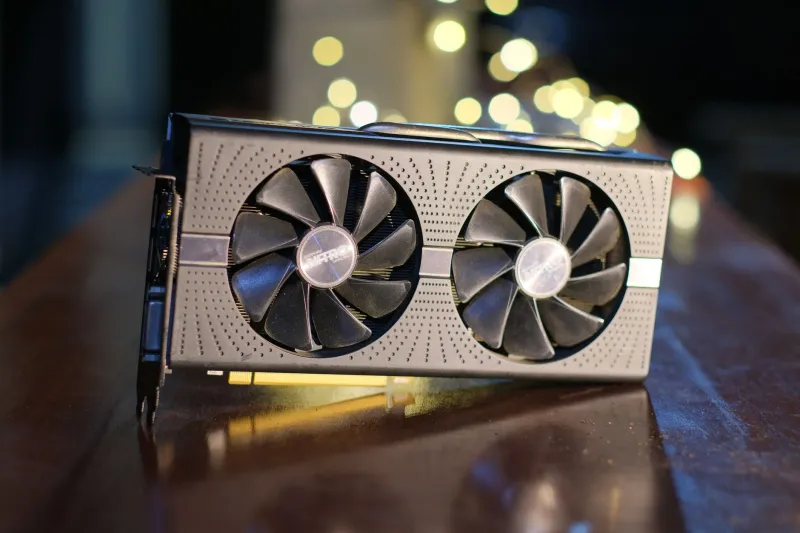
A used graphics card is the single best-value upgrade in PC gaming. It is also the fastest way to hand £300 to a stranger in a Tesco car park and drive home with a card that artefacts the moment a shader compiles. Both things are true, and neither of them is going away.
So treat the meet-up like a ranked tryout. Nobody signs a player off the back of a screenshot and a friendly DM — you put them in a lobby and watch what happens under load. Same rules apply here, except the lobby is a layby off the A34 and the coach is you, a torch and a USB stick.
The kit that lives in your boot
You don't need much, and most of it you already own. Pack it the night before so you're not scrabbling around for a screwdriver at 11:58.
- A USB stick loaded with GPU-Z, HWiNFO64, a stress tool (OCCT, FurMark or Superposition) and a folder for screenshots. Download the offline installers at home — service station Wi-Fi will let you down.
- A laptop, charged, with your phone as a hotspot for one job only: cross-checking the card's BIOS against the TechPowerUp database.
- A torch and a microfibre cloth. You are going to look at dust patterns and thermal pads, and you cannot do that by squinting.
- A small screwdriver and a tape measure, for checking card length against your case before you commit.
- A printed checklist. Ticking boxes on paper stops you going soft when the seller is nice and the price is good.
- A mate, if you can swing it. Two sets of eyes, one of whom isn't emotionally invested in the purchase.
If you're going the bring-your-own-bench route, add a compact test rig and a pure sine wave inverter rated well above what the system draws. Cheap modified sine inverters and modern PSUs are a bad marriage, and you do not want a failed boot to be the reason you walk away from a perfectly good card.
Picking the pitch
Motorway services and big supermarket car parks are the correct venues and it's not paranoia, it's just good manners plus CCTV. Daylight, foot traffic, a Costa within sprinting distance and enough space to lay a card on a flat surface without kneeling in gravel.
Message the seller the day before with three things: the time, the postcode, and a plain statement that you'll be testing the card before paying. Anyone who gets weird about that has told you everything you need to know. Meet at midday if you can — car park lighting at 4pm in November is not a diagnostic tool.
And tell someone where you are. Text a mate the location and the seller's profile name. It takes eight seconds.
The 20-minute gauntlet
Minutes 0–4: eyes only. Card out of the box, backplate up, torch on. Look for uniform dust shadows around the fans, staining on the PCB near the VRMs, discoloured thermal pads and any sign the cooler has been off. Check the serial sticker against the box and the listing. Spin each fan by hand — it should feel smooth and slightly resistant, not gritty, not loose, not clicking.
Minutes 4–8: boot and identify. Into the seller's rig if they've offered one, or your own bench box. GPU-Z first, before anything else. Confirm the reported model matches what you're paying for, then compare the BIOS version against the TechPowerUp database. A flashed BIOS on a card sold as stock is a red flag the size of a motorway sign.
Minute 8: screenshot everything. GPU-Z's main tab and the Sensors tab. You want that timestamped evidence on your own drive, not just in your memory.
Minutes 8–16: load it up. Eight solid minutes of stress. Watch three numbers on HWiNFO: core temperature, memory junction temperature and the PerfCap Reason field. Core in the mid-70s under sustained load is normal for most air-cooled cards; north of 85°C with the fans screaming suggests dried paste or a cooler that's been abused. Memory temps climbing past 100°C on a GDDR6X card is your cue to haggle hard or walk.
Also watch the clock. A card that starts at 1900MHz and sags to 1500MHz inside four minutes is thermally throttling, and that's the card's personality, not a one-off.
Minutes 16–20: the money conversation. You've now got data. Use it. "It's holding 78°C but the memory's at 96 and the fans are at 90% — I'll do £40 less or I'll leave it." That's not rudeness, that's a benchmark result.
Spotting an ex-mining card
Miners are not villains and a well-cooled mining card can be a genuine bargain. But you should price it as one. The tells are consistent:
- Fans that have run at 100% for two years — check for bearing noise and blade wobble.
- Sun-bleached or yellowed plastics and sticker residue on the backplate from a riser mount.
- A seller listing three or four identical cards, or using phrases like "used for light gaming" on a 3090.
- Thermal pads that have gone hard and shiny, or paste that's squeezed out around the die.
- A BIOS that doesn't match the retail version, or a card that reports an unusual power limit.
None of these are automatic noes. All of them are leverage.
The walk-away list
Artefacts on screen. Fan grinding or not spinning at all. Any smell of hot electronics. A seller who won't let you run the test. A serial number that doesn't match the listing photos. A price so good it's explaining itself. Any of those and you shake hands, say cheers, and drive off with your money intact. There is always another card on Marketplace by Tuesday.
Payment, plainly
Posted deals: PayPal Goods & Services, every time, and swallow the fee. In-person: bank transfer is cleaner than cash and gives you a record, but you lose chargeback protection, so only transfer after the test is done and you've photographed the card's serial and the seller's listing. Ask for a two-line written note — name, date, price, serial. Most people will do it without blinking. The ones who won't have told you something.
Twenty minutes. One USB stick. A torch. That's the whole barrier between a bargain and a bad story. Go loaded, not lucky.