Plugged In, Let Down: A UK Field Test of Powerline Ping
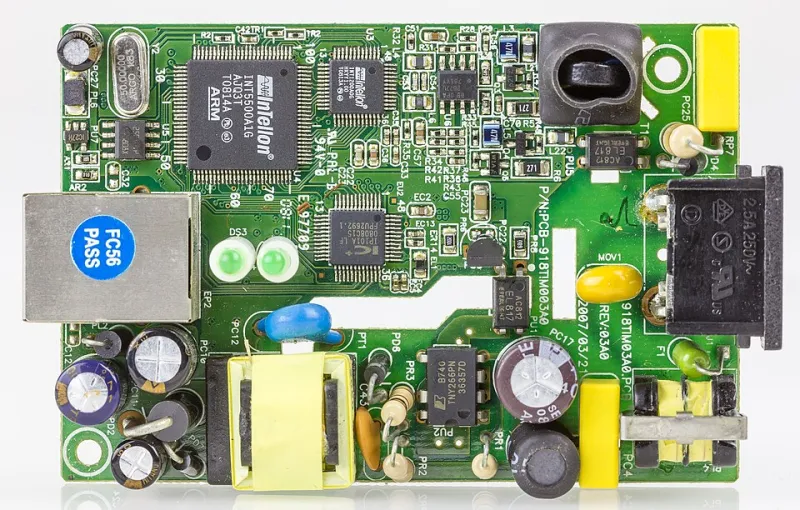
Photo: Raimond Spekking, CC BY-SA 4.0, via Wikimedia Commons
Powerline adapters have become the default panic purchase for UK players who want wired internet without drilling through a wall. You see the pitch everywhere: plug one adapter near the router, plug the other near your PC or console, and boom — stable ping, no trailing cables, no landlord drama. At £30 to £60 for a budget twin-pack, it feels like a cheat code.
Here at Go Loaded, we are all for cheap gear that actually moves your ranked performance. But after testing budget powerline kits in three very normal UK homes, the honest answer is messier than the box art. In some rooms, powerline beat Wi-Fi. In others, it was noticeably worse. And in one rented flat, it turned a playable lobby into a stuttering mess.
The test setup: same line, same game, same sweaty lobby
We kept the variables as tight as a ranked loadout. Same ISP line, same router, same gaming PC and console, same ranked shooter, same 30-minute sessions across off-peak and the 8pm to 10pm danger zone. We logged idle ping, jitter, packet loss and those horrible one-second freeze frames that get you traded before you have even seen the enemy.
Each home got three setups: the existing Wi-Fi, a budget AV1000-class powerline twin-pack, and a 15-metre flat Cat6 Ethernet run taped along skirting boards. No magic settings, no priority traffic snake oil — just the hardware most players would actually buy.
Home one: the Victorian terrace
Solid brick, a rear extension, the router in the front room and the gaming PC upstairs at the back. Classic UK terrace geography. The Wi-Fi was not amazing, but it was not tragic either: roughly 18–24ms idle ping with 4–7ms jitter and the occasional 60ms spike when someone opened the microwave.
The powerline kit was meant to fix all that. Instead, it averaged 26–34ms with 9–15ms jitter. Every time the washing machine kicked into a spin, the connection would lurch into three-digit ping territory. The flat Ethernet run sat at 9–12ms with 1–2ms jitter and basically refused to misbehave.
The lesson: old wiring is not automatically bad, but it is unpredictable. Powerline does not create a clean private cable. It sends data over the same mains circuit that feeds your boiler, your dimmer switches and that dodgy phone charger from 2014. You are basically asking your ping to survive a house-wide electrical pub quiz.
Home two: the 1990s new-build
This one was kinder. Upstairs and downstairs sockets behaved, the router was central, and the Wi-Fi held 12–16ms with 3–6ms jitter. The powerline adapters managed 15–20ms with similar jitter, occasionally dipping below Wi-Fi during peak hours. It was close enough that a casual player might not notice.
But close is not the same as better. The flat Ethernet run still won at 8–11ms with rock-solid jitter. If you already have decent Wi-Fi in a newer home, a £40 powerline kit is not a performance upgrade. It is a sideways move with extra plugs and another device to reboot when the lobby starts acting strange.
Home three: the rented flat with a shared consumer unit
This was the horror show. The flat had congested Wi-Fi — 28–45ms, 10–20ms jitter, 1–2% packet loss — so powerline looked like the obvious escape. It was not. The adapters delivered 35–70ms, jitter of 25–40ms and packet loss that climbed past 3% during peak hours. When a neighbour used the kettle or oven, the connection would drop for a second or two.
Shared consumer units are a nightmare for powerline because the signal does not respect your front door. It can travel across circuits and pick up noise from appliances you do not control. If your landlord has split the building in the cheapest possible way, your powerline adapter is essentially negotiating with next door's air fryer.
A 15-metre flat Ethernet cable along the skirting, under a rug and around a door frame measured 10–13ms with clean jitter. No drilling. No permanent damage. Just £12 of cable and a bit of shame about the cable clips.
Why powerline ping lies to you
Powerline adapters are sold on throughput numbers — AV600, AV1000, AV2000 — but ping is not throughput. A kit can post a shiny speed test and still add latency through error correction, retries and noisy mains. The 'up to' figures on the box are lab conditions, not your mum's tumble dryer cycle.
They also inherit every problem on the ring main: surge-protected extension leads, cheap LED drivers, dimmer switches, boiler pumps, fridge compressors and crossed circuits. Plugging into a surge protector is especially pointless — it can strangle the signal. Even socket choice matters. The adapter wants a direct wall socket, not a six-way tower from Argos.
So when is powerline actually worth £30?
Buy one only if Wi-Fi is genuinely unusable, a flat Ethernet run is impossible, and you accept it as a last resort rather than a guaranteed upgrade. Choose a retailer with easy returns, test it at peak time, and compare jitter and packet loss — not just the ping number in the scoreboard. If it adds more than 5ms and visible jitter, send it back.
For most UK players, the smarter loadout is boring: a 15-metre flat Cat6 cable, some adhesive trunking and ten minutes of routing. It is cheaper than a powerline kit, faster than almost any Wi-Fi fix and far more predictable than praying to the ring main. Plug in, clip up, and stop letting your adapter lie about your ping.